
In this site, you will get updates on the latest news, entertainment, sports news, Important exam Information, online education, latest technical updates, jobs, computer tricks videos
Thursday, January 24, 2019

Friday, January 18, 2019
How to partition hard disk of your computer ll Hard disk ki partition kese karen????
Step 1: Launch EaseUS Partition Master
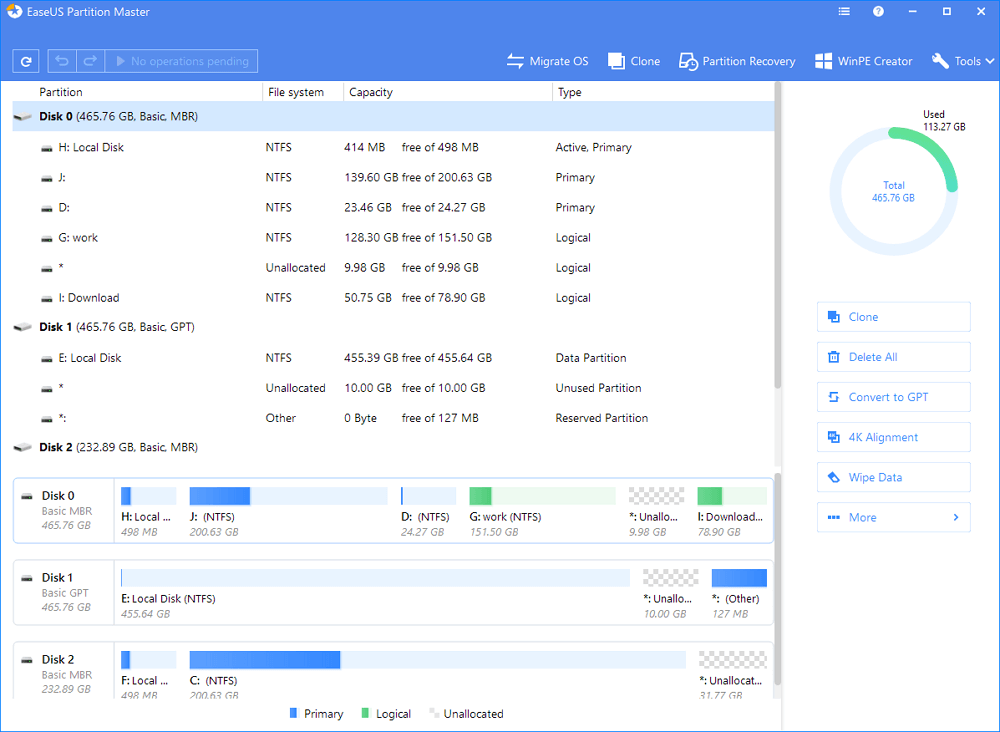
Step 2: Free up space to extend partition
If the hard drive has enough unallocated space to extend the target partition, jump to Step 3 and continue.
If not, free up space first:
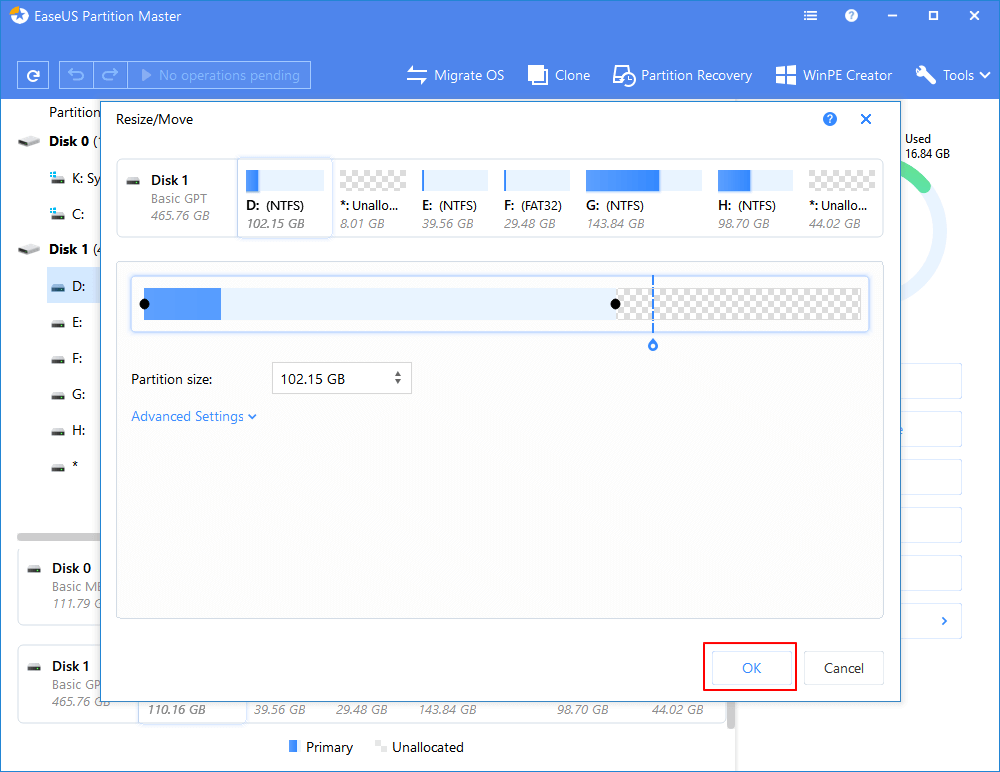
1. Right-click on a partition next to the target partition and select "Resize/Move".
2. Drag the partition ends to free up space, leaving enough unallocated space behind the target partition, click "OK".
1. Right-click on a partition next to the target partition and select "Resize/Move".
2. Drag the partition ends to free up space, leaving enough unallocated space behind the target partition, click "OK".
Step 3: Extend partition
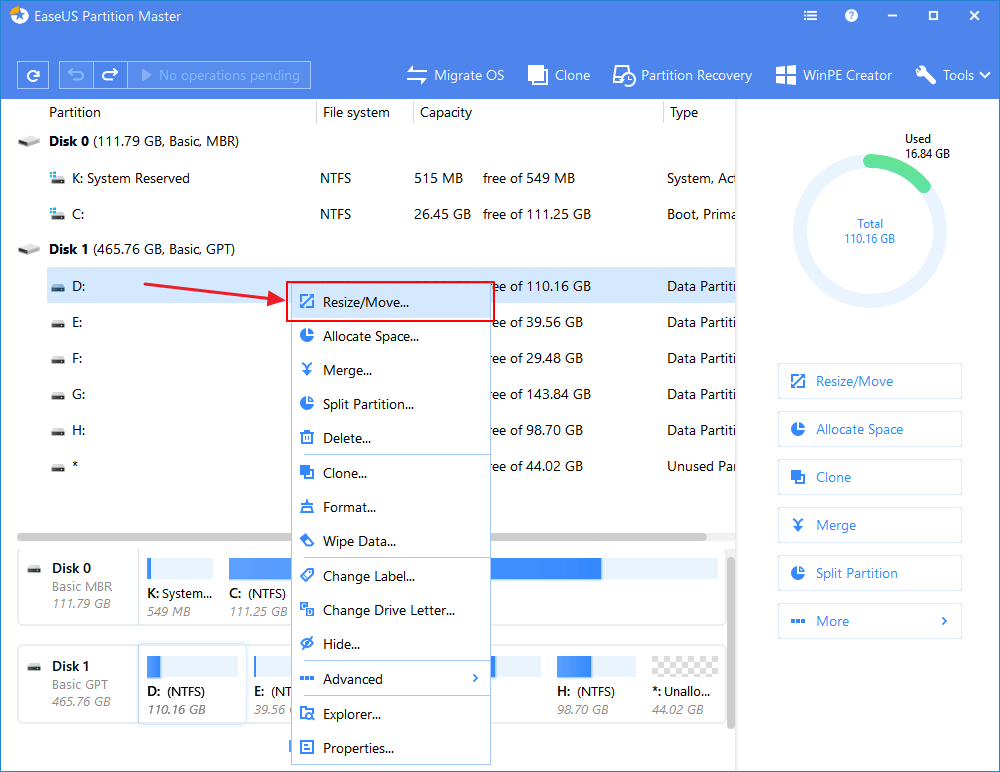
1. Right-click on the target partition and select "Resize/Move".
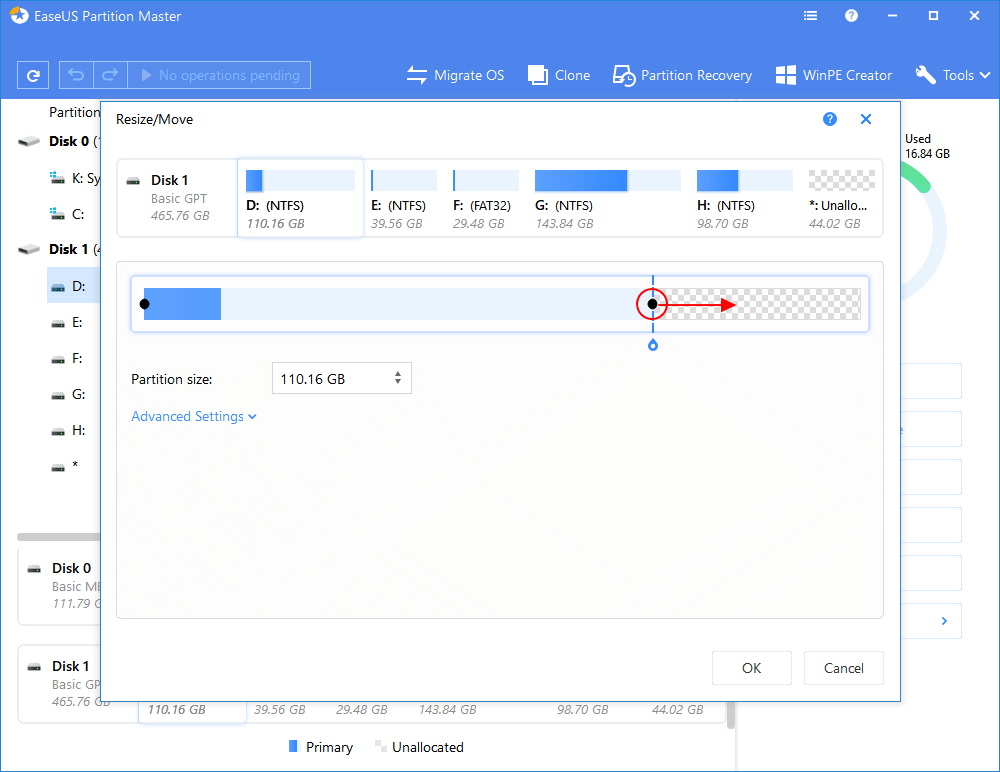
2. Drag the target partition handle into the unallocated space to extend partition.
Step 4: Keep all changes
Click the "Execute Operation" button and click "Apply" to keep all changes.
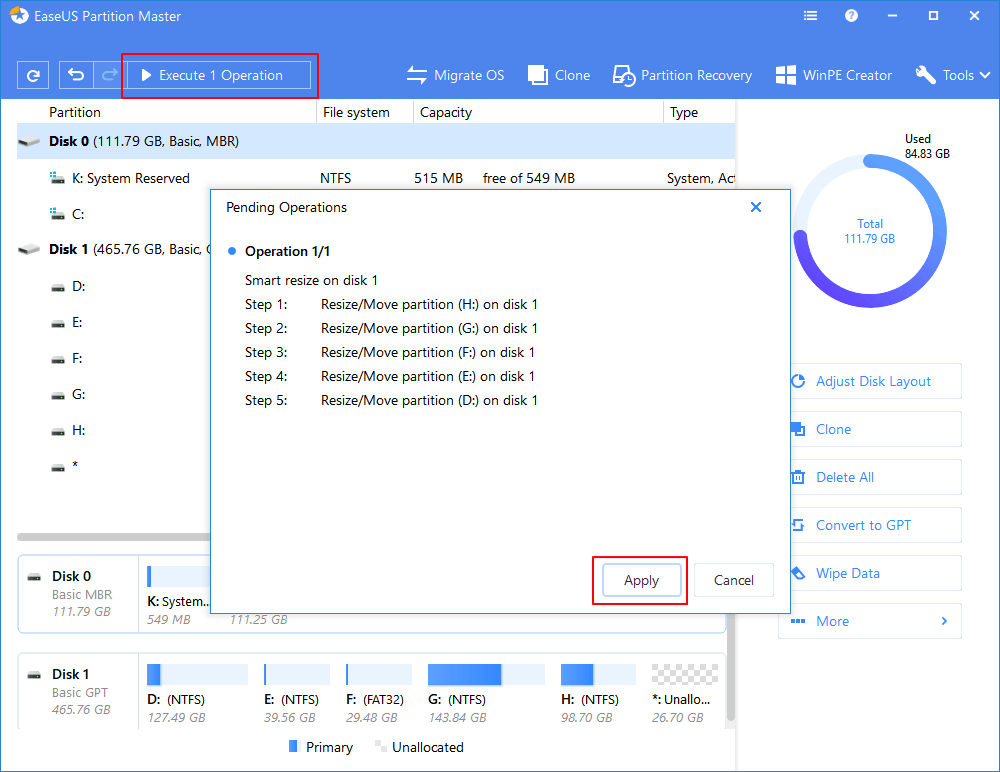
Do you think this hard drive partitioning software is useful? It applies to different Windows partition problems such as to partition Windows 10 for free. Give it a try now.
Monday, January 14, 2019
how to make bar chart in excel in easy way
Today we
will learn how to make bar chart in excel in easy way.
So lets
start…please follow my steps and covert your data in bar chart.
Follow my
steps:-
Step 1: Open Excel Sheet
Step 2: Make your Data Sheet in tabular format
Step 3: Select your data

Step 5: Go To Chart Option

Step 6: Go To Bar Chart Option

Step 7: Select which diagram you
need.

Sunday, January 13, 2019
Wednesday, January 9, 2019
PF Claim Status – Check your EPF Claim Status Online
Provident Fund (PF) is a retirement fund scheme provided to a salaried class person. Both employee and the employer must contribute to it on a monthly basis. Generally, it is 12% of the basic salary by the employee and the same by the employer. The employee can avail the benefits of the investment upon retirement. Employees can also choose to liquidate funds while in employment – this is subject to certain terms and conditions. The contribution made by the employer is equivalent to that of the employee i.e., 12% of the basic pay and DA, every month. In this article, we will see how we can check the status of our PF Withdrawal claim.
Procedure to check PF withdrawal claim online
For claiming funds, a request has to be raised to The Employees’ Provident Fund Organisation (EPFO). The EPFO is a statutory body under the Ministry of Labour and Employment. Upon requesting for PPF withdrawal, there is a possibility that you may not get to know the status of your requisition. To address this problem the EPFO has launched an online process to know the status of your requisition. To know the status of your claim the following information should be available to you:
a. Universal Account Number (UAN)
b. EPF regional office of your employer
c. company
d. Extension code (if relevant)
Keep the above information/documents handy, and then follow the below steps to check the status of your claim online. Step 1: Go to the EPFO portal. Click on Our services> For Employees

Step 2: Click on ‘Know Your PF Status’

Step 3: Enter your UAN and enter the captcha image

PF Withdrawal – Online EPF Withdrawal Procedure
PF Withdrawal – Online EPF Withdrawal Procedure
PF ( Provident Fund ) or EPF is also called the Employee Provident Fund Scheme. It is one where the employees contribute a small portion of their remuneration i.e. 12% of their basic pay every month. A matching amount is contributed by the employer. Such a contribution, together, form a corpus. This is to be used to fund the employee’s retirement. EPF withdrawal by employees can, however, be done earlier itself i.e. during the course of their employment.Here, it would be relevant to mention that EPF organisation has made the allotment of UAN i.e. the Universal Account Number compulsory for all the employees covered under the PF Act. UAN would be linked to the employee’s EPF account. The UAN remains portable throughout the lifetime of an employee and there is no need to apply for EPF transfer at the time of changing jobs.
EPF WITHDRAWAL
1. When can EPF be withdrawn
One may choose to withdraw EPF completely or partially. EPF can be completely withdrawn under any of the following circumstances:
a. When an individual retires from employment
b. When an individual remains unemployed for a period of 2 months or more. Here, it needs a mention that the fact that the individual is unemployed for more than 2 months has to be certified by a gazetted officer. Further, complete withdrawal of EPF while switching over from one job to another without remaining unemployed for 2 months or more(i.e. During the interim period between changing jobs), will be against the PF rules and regulations and therefore illegal. Partial withdrawal of EPF can be done under certain circumstances and subject to certain prescribed conditions which have been discussed in brief below:
| Sl No | Particulars of reason for withdrawal | Limit for withdrawal | No of years of service criteria | Other conditions |
|---|---|---|---|---|
| 1 | Marriage | Up to 50% of employee’s share of contribution to EPF | 7 years | For the marriage of self, son/daughter, brother/sister |
| 2 | Education | Upto 50% of employee’s share of contribution to EPF | 7 years | For the education of either himself or his children after class 10 |
| 3 | Purchase of land / purchase or construction of a house | For land – upto 24 times of monthly wages plus Dearness allowance For house – upto 36 times of monthly wages plus Dearness allowance | 5 years | The asset i.e. land or the house should be in the name of the employee or spouse or Jointly. |
| 4 | Home loan repayment | Upto a maximum of 90 %, from both employee’s contribution and employer contribution in Employee Provident Fund. | 10 years | i. The property should be registered in the name of the employee or spouse or jointly ii. Withdrawal permitted subject to furnishing of requisite documents as called for by the EPFO relating to the housing loan availed, iii. The accumulation in the member's PF account (or together with the spouse), including the interest, has to be more than Rs 20,000. |
| 5 | Renovation of house | Up to 12 times of the monthly wages | 5 years | The property should be registered in the name of the employee or spouse or jointly. |
| 6 | A little before retirement | Upto 90% of accumulated balance with interest | Once he reaches 57 years ( as per recent amendment) | For himself |
2. Procedure for EPF withdrawal
Broadly, withdrawal of EPF can be done either by:- Submission of a physical application for withdrawal
- Submission of an online application
1. Submission of a physical application
For this, one can download the new composite claim (Aadhar)/ composite claim form (Non-Aadhar) from here :
The new composite claim form (Aadhar) can be filled and submitted to the respective jurisdictional EPFO office without the attestation of the employer whereas, the new composite claim form (Non-aadhaar) shall be filled and submitted with the attestation of the employer to the respective jurisdictional EPFO office. One may also note, that in case of partial withdrawal of EPF amount by an employee for various circumstances as discussed in the above table, very recently, the requirement to furnish various certificates has been done away with and the option of self-certification has been introduced for the EPF subscribers. (For details, you can refer order dated 20.02.2017 of the EPFO by clicking here)
2. Submission of an online application
Interestingly, the EPFO has very recently come up with the online facility of withdrawal which has rendered the entire process easier and less time-consuming.Prerequisite: To apply for withdrawal of EPF online through EPF Portal, make sure that the following conditions are met:
- UAN (Universal Account Number) is activated and the mobile number used for activating the UAN is in working condition
- UAN is linked with your KYC i.e. Aadhaar, PAN and bank details along with the IFSC code.
If the above conditions are met, then the requirement of an attestation of the previous employer to carry out the process of withdrawal can be done away with.
Steps to apply for EPF withdrawal online:
Step 1: Go to the UAN portal by clicking here Step 2: Login with your UAN and password and enter the captcha. Step 3: Then, click on the tab ‘Manage’ and select KYC to check whether your KYC details such as Aadhaar, PAN and bank details are correct and verified or not.
 Step 4: After the KYC details are verified, go to the tab Online Services’ and select the option ‘Claim’ from the drop-down menu.
Step 5: The ‘Claim’ screen will display the member details, KYC details and other service details. Click on the tab ‘Proceed For Online Claim’ to submit your claim form.Step 6: In the claim form, select the claim you require i.e full EPF Settlement, EPF Part withdrawal (loan/advance) or pension withdrawal, under the tab ‘I Want To Apply For’. If the member is not eligible for any of the services like PF withdrawal or pension withdrawal, due to the service criteria, then that option will not be shown in the drop-down menu.

Subscribe to:
Posts (Atom)

Popular Posts
-
PF Withdrawal – Online EPF Withdrawal Procedure PF ( Provident Fund ) or EPF is also called the Employee Provident Fund Scheme. ...

Thursday, January 24, 2019
Friday, January 18, 2019
How to partition hard disk of your computer ll Hard disk ki partition kese karen????
Step 1: Launch EaseUS Partition Master
Step 2: Free up space to extend partition
If the hard drive has enough unallocated space to extend the target partition, jump to Step 3 and continue.
If not, free up space first:
1. Right-click on a partition next to the target partition and select "Resize/Move".
2. Drag the partition ends to free up space, leaving enough unallocated space behind the target partition, click "OK".
1. Right-click on a partition next to the target partition and select "Resize/Move".
2. Drag the partition ends to free up space, leaving enough unallocated space behind the target partition, click "OK".
Step 3: Extend partition
1. Right-click on the target partition and select "Resize/Move".
2. Drag the target partition handle into the unallocated space to extend partition.
Step 4: Keep all changes
Click the "Execute Operation" button and click "Apply" to keep all changes.
Do you think this hard drive partitioning software is useful? It applies to different Windows partition problems such as to partition Windows 10 for free. Give it a try now.
Monday, January 14, 2019
how to make bar chart in excel in easy way
Today we
will learn how to make bar chart in excel in easy way.
So lets
start…please follow my steps and covert your data in bar chart.
Follow my
steps:-
Step 1: Open Excel Sheet
Step 2: Make your Data Sheet in tabular format
Step 3: Select your data
Step 5: Go To Chart Option
Step 6: Go To Bar Chart Option
Step 7: Select which diagram you
need.
Sunday, January 13, 2019
Wednesday, January 9, 2019
PF Claim Status – Check your EPF Claim Status Online
Provident Fund (PF) is a retirement fund scheme provided to a salaried class person. Both employee and the employer must contribute to it on a monthly basis. Generally, it is 12% of the basic salary by the employee and the same by the employer. The employee can avail the benefits of the investment upon retirement. Employees can also choose to liquidate funds while in employment – this is subject to certain terms and conditions. The contribution made by the employer is equivalent to that of the employee i.e., 12% of the basic pay and DA, every month. In this article, we will see how we can check the status of our PF Withdrawal claim.
Procedure to check PF withdrawal claim online
For claiming funds, a request has to be raised to The Employees’ Provident Fund Organisation (EPFO). The EPFO is a statutory body under the Ministry of Labour and Employment. Upon requesting for PPF withdrawal, there is a possibility that you may not get to know the status of your requisition. To address this problem the EPFO has launched an online process to know the status of your requisition. To know the status of your claim the following information should be available to you:
a. Universal Account Number (UAN)
b. EPF regional office of your employer
c. company
d. Extension code (if relevant)
Keep the above information/documents handy, and then follow the below steps to check the status of your claim online. Step 1: Go to the EPFO portal. Click on Our services> For Employees
Step 2: Click on ‘Know Your PF Status’
Step 3: Enter your UAN and enter the captcha image
PF Withdrawal – Online EPF Withdrawal Procedure
PF Withdrawal – Online EPF Withdrawal Procedure
PF ( Provident Fund ) or EPF is also called the Employee Provident Fund Scheme. It is one where the employees contribute a small portion of their remuneration i.e. 12% of their basic pay every month. A matching amount is contributed by the employer. Such a contribution, together, form a corpus. This is to be used to fund the employee’s retirement. EPF withdrawal by employees can, however, be done earlier itself i.e. during the course of their employment.Here, it would be relevant to mention that EPF organisation has made the allotment of UAN i.e. the Universal Account Number compulsory for all the employees covered under the PF Act. UAN would be linked to the employee’s EPF account. The UAN remains portable throughout the lifetime of an employee and there is no need to apply for EPF transfer at the time of changing jobs.
EPF WITHDRAWAL
1. When can EPF be withdrawn
One may choose to withdraw EPF completely or partially. EPF can be completely withdrawn under any of the following circumstances:
a. When an individual retires from employment
b. When an individual remains unemployed for a period of 2 months or more. Here, it needs a mention that the fact that the individual is unemployed for more than 2 months has to be certified by a gazetted officer. Further, complete withdrawal of EPF while switching over from one job to another without remaining unemployed for 2 months or more(i.e. During the interim period between changing jobs), will be against the PF rules and regulations and therefore illegal. Partial withdrawal of EPF can be done under certain circumstances and subject to certain prescribed conditions which have been discussed in brief below:
| Sl No | Particulars of reason for withdrawal | Limit for withdrawal | No of years of service criteria | Other conditions |
|---|---|---|---|---|
| 1 | Marriage | Up to 50% of employee’s share of contribution to EPF | 7 years | For the marriage of self, son/daughter, brother/sister |
| 2 | Education | Upto 50% of employee’s share of contribution to EPF | 7 years | For the education of either himself or his children after class 10 |
| 3 | Purchase of land / purchase or construction of a house | For land – upto 24 times of monthly wages plus Dearness allowance For house – upto 36 times of monthly wages plus Dearness allowance | 5 years | The asset i.e. land or the house should be in the name of the employee or spouse or Jointly. |
| 4 | Home loan repayment | Upto a maximum of 90 %, from both employee’s contribution and employer contribution in Employee Provident Fund. | 10 years | i. The property should be registered in the name of the employee or spouse or jointly ii. Withdrawal permitted subject to furnishing of requisite documents as called for by the EPFO relating to the housing loan availed, iii. The accumulation in the member's PF account (or together with the spouse), including the interest, has to be more than Rs 20,000. |
| 5 | Renovation of house | Up to 12 times of the monthly wages | 5 years | The property should be registered in the name of the employee or spouse or jointly. |
| 6 | A little before retirement | Upto 90% of accumulated balance with interest | Once he reaches 57 years ( as per recent amendment) | For himself |
2. Procedure for EPF withdrawal
Broadly, withdrawal of EPF can be done either by:- Submission of a physical application for withdrawal
- Submission of an online application
1. Submission of a physical application
For this, one can download the new composite claim (Aadhar)/ composite claim form (Non-Aadhar) from here :
The new composite claim form (Aadhar) can be filled and submitted to the respective jurisdictional EPFO office without the attestation of the employer whereas, the new composite claim form (Non-aadhaar) shall be filled and submitted with the attestation of the employer to the respective jurisdictional EPFO office. One may also note, that in case of partial withdrawal of EPF amount by an employee for various circumstances as discussed in the above table, very recently, the requirement to furnish various certificates has been done away with and the option of self-certification has been introduced for the EPF subscribers. (For details, you can refer order dated 20.02.2017 of the EPFO by clicking here)
2. Submission of an online application
Interestingly, the EPFO has very recently come up with the online facility of withdrawal which has rendered the entire process easier and less time-consuming.Prerequisite: To apply for withdrawal of EPF online through EPF Portal, make sure that the following conditions are met:
- UAN (Universal Account Number) is activated and the mobile number used for activating the UAN is in working condition
- UAN is linked with your KYC i.e. Aadhaar, PAN and bank details along with the IFSC code.
If the above conditions are met, then the requirement of an attestation of the previous employer to carry out the process of withdrawal can be done away with.
Steps to apply for EPF withdrawal online:
Step 1: Go to the UAN portal by clicking here Step 2: Login with your UAN and password and enter the captcha.Step 3: Then, click on the tab ‘Manage’ and select KYC to check whether your KYC details such as Aadhaar, PAN and bank details are correct and verified or not.Step 4: After the KYC details are verified, go to the tab Online Services’ and select the option ‘Claim’ from the drop-down menu.
Step 5: The ‘Claim’ screen will display the member details, KYC details and other service details. Click on the tab ‘Proceed For Online Claim’ to submit your claim form.Step 6: In the claim form, select the claim you require i.e full EPF Settlement, EPF Part withdrawal (loan/advance) or pension withdrawal, under the tab ‘I Want To Apply For’. If the member is not eligible for any of the services like PF withdrawal or pension withdrawal, due to the service criteria, then that option will not be shown in the drop-down menu.
Subscribe to:
Posts (Atom)